BAS Lodgement: A Simple Guide for Small Business

BAS Lodgement: A Simple Guide for Small Business
If I register for GST, I need to lodge BAS on time - even if I have nothing to report. For most small businesses, that means checking GST, PAYG withholding, PAYG instalments, due dates, Xero figures, and payment or refund details before I lodge.
Here’s the short version:
- I usually need to lodge BAS if I’m registered for GST
- GST registration is usually required once turnover hits $75,000, or $150,000 for non-profits
- Taxi and ride-share drivers must register no matter their turnover
- A nil BAS still needs to be lodged
- Most small businesses lodge quarterly
- Standard quarterly due dates are 28 October, 28 February, 28 April, and 28 July
- Monthly BAS usually applies from $20 million GST turnover
- In Xero, I need to check labels like G1, 1A, 1B, W1, and W2
- Purchases over $82.50 incl. GST usually need a valid tax invoice to claim GST credits
- Late lodgement penalties can start at $313 for each 28-day period overdue, up to $1,565
What matters most is simple: keep records up to date, reconcile before the period ends, check payroll against STP, lodge on time, and keep proof of submission.
That’s the whole job in plain English, and the rest of the guide shows how I do it in Xero without making avoidable mistakes.
How to Prepare BAS in Xero (Step-by-Step Guide!)

sbb-itb-98a37a2
BAS basics: who lodges, what is reported and when it is due
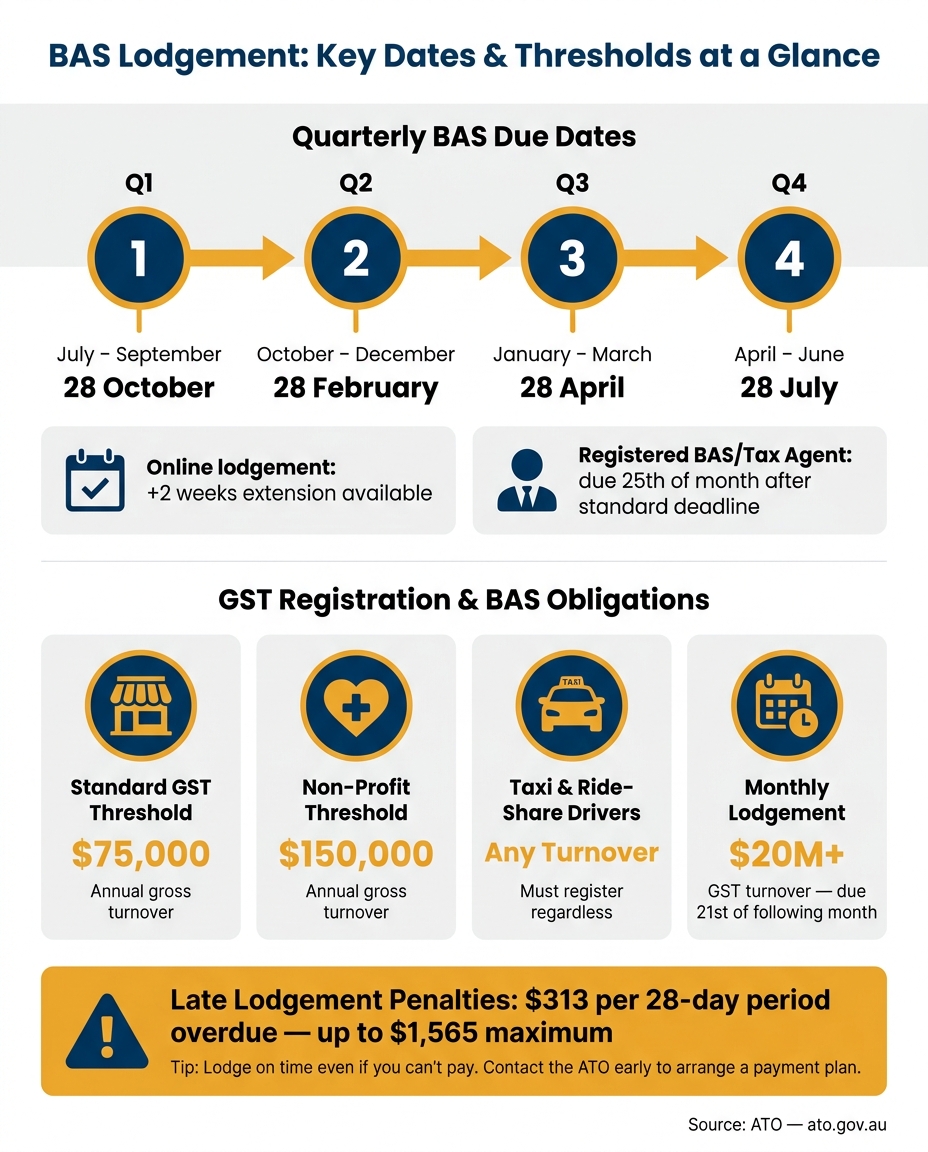
BAS Lodgement Due Dates & Key Thresholds for Small Business
Who needs to lodge BAS
GST registration becomes mandatory once your annual gross turnover hits $75,000 or more - or $150,000 for non-profit organisations. If you're below those thresholds, registration is optional. But once you register, you still need to lodge BAS.
Taxi and ride-share drivers are a special case. They must register for GST and lodge BAS no matter their turnover. If you employ staff, you also need to report PAYG withholding on your BAS, even when your turnover sits below the GST threshold. The same goes if the ATO has placed you on PAYG instalments. Your business structure doesn't change this either - sole traders, companies, partnerships and trusts can all be required to lodge.
And yes, even if nothing happened during the period, you still need to lodge a nil BAS by the due date.
Once that's clear, the next job is working out which BAS labels apply to your business.
The BAS labels most small businesses see
Your BAS is split into sections, and you only complete the labels that apply to you.
| Label | Description | What you report |
|---|---|---|
| G1 | Total sales (incl. GST) | Total sales, including GST |
| 1A | GST on sales | GST collected from customers |
| 1B | GST on purchases | GST credits claimed on business expenses |
| W1 | Total wages | Gross salary, wages, and other payments to employees |
| W2 | PAYG withholding | Tax withheld from W1 payments |
| T1 / T7 | PAYG instalments | Prepayment toward your annual income tax |
If you don't have employees, you won't use W1 and W2. If you're not on PAYG instalments, T1 and T7 won't apply.
After the labels, the next thing to pin down is timing.
Lodgement frequency and due dates
Most small businesses lodge quarterly by default. The standard due dates are:
| Quarter | Reporting period | Due date |
|---|---|---|
| 1 | July – September | 28 October |
| 2 | October – December | 28 February |
| 3 | January – March | 28 April |
| 4 | April – June | 28 July |
If a due date lands on a weekend or public holiday, it shifts to the next business day. Businesses with a GST turnover of $20 million or more must lodge monthly, and each BAS is due on the 21st of the following month.
Online lodgement often gives most quarterly BASs an extra two weeks to lodge and pay. If you use a registered BAS or tax agent, you may also get extra time, with due dates often falling on the 25th of the month after the standard deadline.
With your BAS obligations and due dates sorted, you can get your records ready before entering figures in Xero.
Get your records ready before you start
Records you need to prepare BAS correctly
Accurate BAS reporting starts with complete records. That means keeping tax invoices for all business sales and purchases, bank statements, merchant settlement reports like EFTPOS or HICAPS summaries, and payroll records, including payslips and Single Touch Payroll (STP) reports.
If a purchase is over $82.50 incl. GST, you need a valid tax invoice to claim a GST credit. You also need to keep financial records for at least five years.
Mixed-use expenses need a bit more care. If you claim part of a mobile phone plan or home internet bill, keep records that show the business-use percentage so the claim can be split the right way.
Once your records are in order, the next step is to code them properly in Xero before the BAS period ends.
Set up Xero so BAS figures are reliable
For Xero to produce BAS figures you can rely on, a few settings need to be right from day one. Start by choosing the GST accounting method that matches the way you report. Cash basis reports GST when payment is received or made. Accruals basis reports it when invoices are issued.
You also need to code transactions the right way: taxable, GST-free, or input-taxed. Those codes feed straight into the BAS report, so if something is coded wrong, the error shows up in your BAS labels.
A connected bank feed can help a lot here. It cuts down manual entry and makes coding issues easier to spot early. If you employ staff, make sure payroll is aligned with STP Phase 2 so your W1 and W2 figures match your STP data.
With those settings in place, reconciliation becomes your last check before lodgement.
Reconcile your books before each BAS period ends
Even a well-set-up Xero file can drift off track if you don't keep the books current. Waiting until BAS day is where small mistakes pile up. Reconciling bank accounts each week makes it easier to spot missing transactions, duplicates, or incorrect GST codes before they turn into a mess.
Before you generate the BAS report, clear any transactions sitting in suspense accounts by coding them correctly. If they aren't allocated, they won't appear in BAS calculations.
It's also worth checking that payroll totals in Xero match your STP reports and payslips. If W1, W2, and STP data don't line up, that can trigger ATO reviews. That's what keeps your GST, W1, and W2 figures lined up before lodgement.
How to complete and lodge BAS using Xero
Review the BAS report and match figures to ATO labels
Open Xero’s BAS report first, then check that the BAS period and GST method match what the ATO has on record.
Most small businesses use Simpler BAS. That means you’ll usually be working with five labels, and each one needs to match what’s sitting in Xero.
| BAS Label | What It Represents | What to Check in Xero |
|---|---|---|
| G1 | Total sales | Make sure it is the GST-inclusive total and includes taxable, GST-free and input-taxed sales |
| 1A | GST collected on sales | Should equal 1/11 of taxable sales |
| 1B | GST credits on purchases | Check that you have valid tax invoices for business-related purchases over $82.50 |
| W1 | Gross wages paid | Cross-check against the Payroll Activity Summary report |
| W2 | PAYG withholding | Match to STP records for the period |
W1 and W2 should also match Xero’s Payroll Activity Summary and your STP records. If they don’t, stop there and sort that out before lodging.
Next, run the GST Reconciliation report. This helps you compare the GST Xero has worked out against the general ledger. If the figures don’t match, the usual culprits are pretty common:
- transactions coded to “No GST” when GST should have been applied
- manual journals affecting GST
- private expenses included by mistake
Also check that GST-free items, such as basic food and medical services, are included in G1 but do not increase 1A.
Once everything lines up, lodge the BAS in Xero and keep the confirmation.
Lodge with the ATO and keep proof of submission
When the figures are right, you can submit the BAS straight from Xero. Because Xero is SBR-enabled software, it can lodge directly with the ATO.
If you’d rather have someone else handle it, a registered BAS or tax agent can lodge for you. Lodging through a registered agent will usually give you a two-week extension on the standard quarterly due date. And if there’s nothing to report, you should still lodge a nil BAS in Xero.
After you submit, save or screenshot the confirmation screen. Make sure it shows the lodgement reference number and timestamp. That’s your proof of submission. Xero also locks the period after lodgement, which helps stop accidental changes to transactions that have already been reported.
Pay the BAS amount or manage a refund
If 1A is higher than 1B, you’ll need to pay the difference. If 1B is higher than 1A, you should be due a refund. Before lodging, check that your bank details are up to date in the ATO’s online services so you don’t run into refund delays.
If you owe money, the ATO accepts payment by BPAY, credit or debit card - surcharges may apply - and direct debit. You’ll need your Payment Reference Number (PRN) so the payment goes to the right account. And yes, the ATO wants whole dollars only.
If cash flow is tight, still lodge on time. That part matters. Failure-to-lodge penalties start at $313 for each 28 days overdue, up to $1,565. If you contact the ATO early, they can arrange a payment plan.
Then check for any filing errors before the period closes.
Common BAS situations, error fixes and a simple wrap-up
Common BAS scenarios small businesses run into
A few BAS label checks can help you catch mistakes before you lodge.
GST-free sales should flow to G2 and G3. Capital purchases belong at G10. Day-to-day business costs belong at G11.
On the purchases side, G10 is for capital items like machinery, vehicles, and computers. G11 is for non-capital business costs like rent, stationery, and utilities. Any GST paid on business purchases that you can claim back goes to 1B. Insurance needs a closer look, though. Only the part of the premium that includes GST should count towards 1B.
If the ATO has put your business on PAYG instalments, you may also see T1 and, in some cases, T7 on your BAS. These amounts are prepayments towards your yearly income tax. They sit outside your GST and payroll figures.
How to fix BAS errors and avoid repeat mistakes
If your BAS still doesn’t balance, start with the source entries. Fix the transactions first, then check the report again.
If you find an error after lodging, work out whether it’s a minor net error. Net errors of $10,000 or less can usually be fixed on your next BAS. Bigger errors will usually mean revising the original BAS. In most cases, you have up to four years from the original lodgement date to revise a BAS.
In Xero, that usually means correcting the underlying transactions and revising the lodged period if needed. It also helps to keep clear notes on what changed, why it changed, and what records back it up. The ATO says businesses must keep financial records for at least five years.
To stop the same problems from popping up again, stick to a few basic checks:
- Match GST codes to the original tax invoices
- Make sure your bank reconciliation is complete
- Cross-check W1 and W2 against your STP reports
Conclusion: the basics that keep BAS simple
Keep your records up to date, reconcile often, and match payroll to STP before you lodge. Lodge on time, then sort out payment on its own, or contact the ATO early if you need a payment plan.
FAQs
Do I need to lodge BAS if I only registered for GST recently?
Not always.
If you’ve only just registered for GST and your turnover is under $75,000, you don’t need to lodge a BAS.
That said, if the ATO has set you up for PAYG instalments, you may still need to lodge the PAYG section.
How do I know if I should report BAS on cash or accruals?
It depends on your accounting method.
If you account for GST on a cash basis, you report and claim GST when money is received or paid.
If you use accruals, you report and claim GST when the transaction occurs, no matter when payment is made or received.
What should I do if I find a BAS mistake after lodging?
If you spot a BAS mistake after lodging, you can either fix it in your next BAS or submit a revised BAS. Which option you use depends on the type of error and how big it is.
Minor mistakes, like clerical errors or double counting, can usually be corrected in your next BAS. Bigger mistakes will often need a revision through ATO online services or your BAS agent.
If the mistake affects GST or PAYG, make sure you check the right process and any time limits that apply.