Chasing overdue invoices with Xero

Chasing overdue invoices with Xero
Late invoices hurt cash flow fast, so I’d use one clear Xero process every time: check the invoice, confirm the customer record is correct, send reminders, follow up by hand if needed, and keep the debtor ledger clean. That cuts down mistakes like chasing a paid invoice or sending the wrong balance.
Here’s the short version:
- Check the basics first: make sure the invoice was sent, is overdue, and hasn’t already been paid or part-paid.
- Review the customer file: look for notes, payment plans, billing terms, and reminder settings before making contact.
- Use Xero reminders first: send the first email through Xero, then move to a statement or direct contact if the debt stays unpaid.
- Log every follow-up: record calls, emails, payment promises, disputes, and next actions in Xero.
- Clean up the ledger before you chase hard: fix duplicate invoices, unapplied credits, and part-payments so the amount owing is right.
A few numbers show why this matters. The ATO is chasing about $34 billion owed by small businesses, and Director Penalty Notices rose 50% in 2024 compared with 2023. For me, that makes debtor follow-up more than admin work - it’s part of keeping cash ready for wages, BAS, tax, and super.
| Step | What I’d do in Xero | Why it matters |
|---|---|---|
| 1 | Check invoice status and bank reconciliation | Stops me chasing money already paid |
| 2 | Review customer notes and terms | Helps me send the right message |
| 3 | Turn on reminders | Starts follow-up without delay |
| 4 | Send statements or contact the customer direct | Suits older or grouped debts |
| 5 | Update notes and clean debtor balances | Keeps the next step clear |
If I had to sum it up in one line: clean records first, then chase the debt with a steady process.
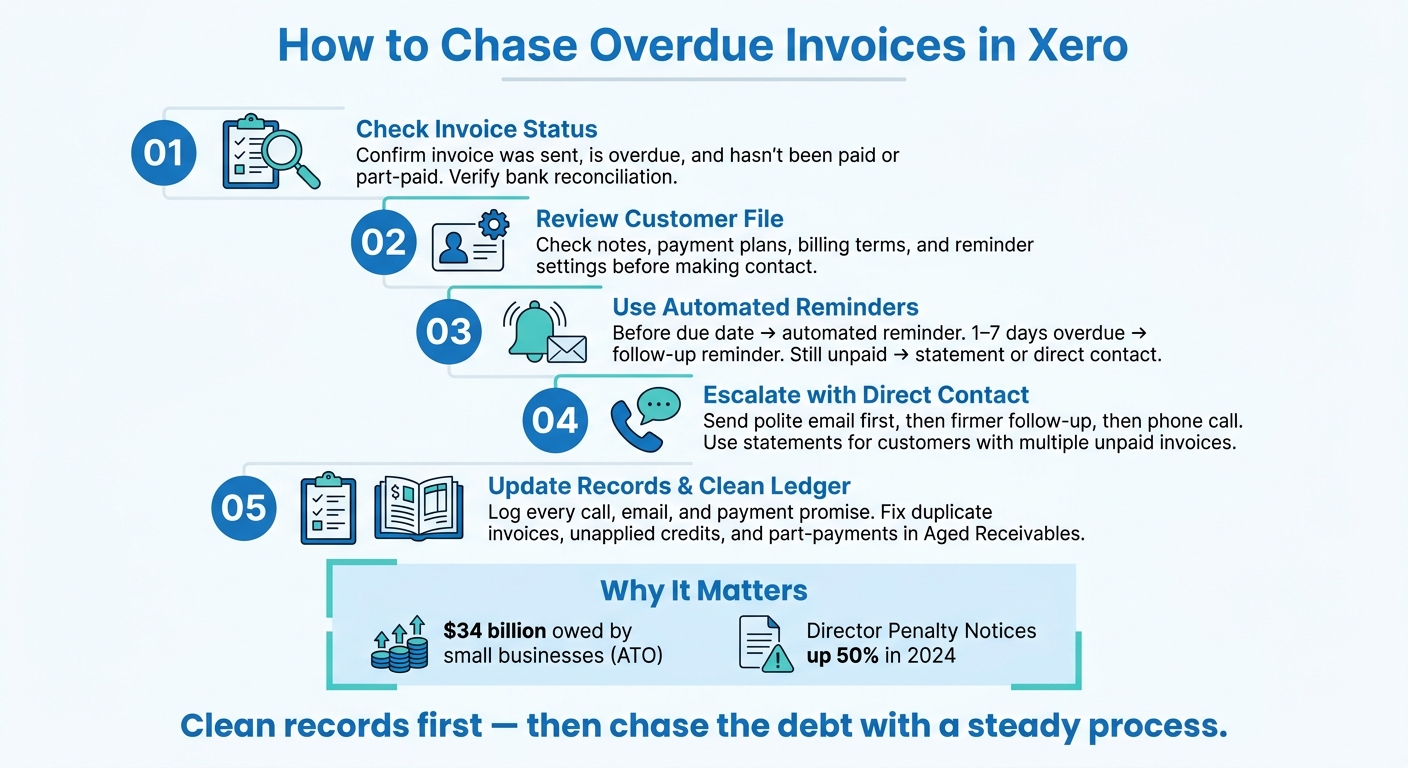
How to Chase Overdue Invoices in Xero: 5-Step Process
How To Chase Overdue Invoices In Xero

Check the invoice and customer record before making contact
Once an invoice is flagged for follow-up, start in Xero. Before you contact the customer, check that the invoice was sent, is past due, and is still unpaid or part-paid.
If the invoice was never sent, or it was left as a draft, the customer may have no idea there’s anything owing. It’s also smart to check bank reconciliation before following up, so you don’t miss a payment or leave one sitting unapplied. When those details match up, then move to the customer record.
Review customer notes and reminder settings
After you’ve confirmed the invoice is overdue, open the customer record in Xero. Check for notes about earlier conversations, agreed payment plans, or billing terms that could change how you handle the follow-up.
Then review the reminder settings. The timing and tone should fit the customer’s situation. If there aren’t any special terms to work around, the next step is to check debtor-list accuracy and catch-up bookkeeping.
Check whether the debtor list needs catch-up bookkeeping
If the balances don’t look right, pause before chasing. Check for duplicate invoices, unmatched part-payments, or unapplied credits.
A clean debtor record helps you avoid chasing the wrong amount. It also means each reminder goes out with the correct balance. Regular bank reconciliations help keep the debtor list accurate, which makes follow-up much easier to handle.
Set up Xero reminders and send the right message at the right time
Once an invoice becomes overdue, send the first reminder automatically. If payment still doesn’t come through, step in manually. That gives you a simple flow: start with automated reminders, then move to statements or direct contact if the invoice stays unpaid.
Turn on invoice reminders in Xero
Xero lets you switch on invoice reminders in settings and edit the reminder emails so they fit your tone. You can send reminders before the due date or shortly after it passes. You can also include a link to the invoice, which makes it easier for the customer to check the details and pay. It also helps to add payment details to the invoice so they can pay straight away.
Keep the message short, factual, and professional.
Use a simple reminder timetable
Using the same sequence each time makes follow-up easier to manage and keeps your process consistent.
| Timing | Action |
|---|---|
| Before the due date | Automated reminder |
| 1–7 days after the due date | Follow-up reminder if the invoice is still unpaid |
| When the invoice is still unpaid after the reminder sequence | Statement or direct contact for overdue accounts |
Choose between reminders, statements, and direct contact
Not every overdue invoice needs the same approach. Automated reminders work well for early follow-up. Statements help when a customer has more than one unpaid invoice, because you can send a statement with the invoice to show all outstanding invoices in one message. Direct contact works best for escalated debts or invoices that have been overdue for a longer time.
| Method | When to Use | Xero Action Required | What to log |
|---|---|---|---|
| Automated Reminders | Early-stage follow-up before or just after the due date | Enable invoice reminders in Xero settings | Xero logs the sent email in the invoice history |
| Statements | Customers with multiple outstanding invoices or at month-end | Select "Send Statement" from the Contacts or Invoices menu | Note in the customer's activity history |
| Direct Contact | Escalated debts or long-overdue invoices | Manual phone call or personalised email | Add a note to the specific invoice or customer record |
Match the method to the stage of the debt. If payment still doesn’t arrive, log each follow-up and move to manual chasing.
sbb-itb-98a37a2
Follow up manually and keep a clear debtor trail
If reminders don't work, move to manual follow-up. Keep it consistent, brief, and logged in Xero.
If the reminder sequence does not trigger payment, switch to manual follow-up and record each contact in Xero.
Send a polite reminder, then escalate in stages
Start with a short email that lists the invoice number, amount, and due date. If there's no reply, send a firmer follow-up and ask for a payment date. When a debt has been overdue for longer, move to direct email or phone contact to check what's going on. It may be a dispute, a cash flow issue, or a missed invoice. Keep the tone professional at every step.
If the customer owes several invoices, stop chasing them one by one and send a statement instead.
Send statements for customers with multiple unpaid invoices
Use a statement when one customer has several overdue invoices. It gives them one balance to review across all open invoices in one place.
After each contact, update Xero straight away so the next follow-up has the full picture.
Record notes after each follow-up
Log every call, email, and promised payment date in Xero. Record:
- the date
- the contact's name
- the outcome
- the promised payment date
- any dispute
- the next action, such as 'follow up Friday if unpaid'
This leaves a clear trail for anyone handling the account next and helps with later escalation.
Keep debtor records clean and close with the next step
How clean bookkeeping makes chasing more reliable
After each reminder or note, check the ledger before you escalate. In plain terms, make sure the debtor ledger is right. Match the bank feeds, then confirm the invoice status lines up with the open balance so you don't end up chasing an invoice that's already been paid.
It also helps to review the Aged Receivables report for common issues, such as:
- duplicate invoices
- unallocated credits or overpayments
- part-payments that haven't been applied the right way
If older invoices should have been written off, write them off or fix them. That way, you're chasing the right balance, not a number that's drifted over time.
A clean debtor ledger keeps every reminder focused on the amount actually owed. If the debtor ledger is months behind, do catch-up bookkeeping before you chase. The Priory Books and Tax offers flat-fee catch-up bookkeeping to reconcile old invoices, apply credits and write-offs, and reset debtor records.
Once the ledger is clean, follow-up becomes much simpler.
Conclusion: the overdue invoice process to follow
Clean records make every reminder, statement and phone call more accurate.
FAQs
How often should I review overdue invoices in Xero?
Review overdue invoices in Xero at least once a week. Pair this with your weekly bank reconciliations so your records stay accurate and up to date, and you can spot unpaid invoices fast.
A quick weekly check also helps keep your debtor ledger clean and makes customer follow-up easier. That matters for cash flow. If it starts eating up too much time, The Priory Books and Tax can step in with catch-up bookkeeping and ongoing finance support.
What should I do if a customer disputes an overdue invoice?
If a customer disputes an overdue invoice, stop automated reminders straight away.
Then review the invoice and any attached documentation in Xero to check that the charges are correct. After that, contact the customer promptly by phone or email so you can understand what’s gone wrong.
Keep clear notes in Xero as you work through the issue. Resolve the dispute as fast as you can, and record any agreed adjustments or payment plans before you restart follow-up.
When should I do catch-up bookkeeping before chasing payment?
Complete catch-up bookkeeping before you start any payment follow-up. That gives you an up-to-date view of your records and shows you exactly which invoices are still unpaid.
It also helps you avoid chasing invoices that have already been paid or sending reminders for invoices with mistakes. The result is simple: your follow-up stays professional, and your cash flow reporting stays dependable.